Turn any X post into a clean shareable image
Capture selected X posts and replies as one clean PNG — including posts taller than your screen. Every capture is made on your device and never uploaded.
Everything you need to screenshot X posts
Built for clean, complete captures — without copy-paste, stitching, or third-party tools.
Pick mode
Click the toolbar icon, then click the posts you want. A crosshair cursor and highlight outline make it obvious what will be captured.
Selected Posts and Replies
Include the main post plus any specific replies you choose, then export them together as one stitched PNG.
Full-post capture
Long posts are automatically scrolled and stitched into one image — even when they're far taller than your browser window.
Download and Share
You can not only save the screenshots, but the text info and photos of the X posts as well.
Private by design
Captures are created on your device and never uploaded. The extension has no account, analytics or telemetry. It goes online only for the optional Pro license check and, when you click Save photos, to download the post's original photos from X's own image server.
Choose the frame color you like
Wrap your capture in the backdrop that fits the moment — Raw, Soft, Sunset, Berry, Mint or Midnight, all free. Pro adds Aurora. Switch styles and the preview updates instantly, so what you download or copy is exactly what you see.
- Raw
- Soft
- Sunset
- Berry
- Mint
- Midnight
- AuroraPro
Four clicks to a perfect screenshot
No setup, no account — just install and go.
Open a post
Head to any post on x.com or twitter.com.

Click the icon
Click the X2PIC icon in your Chrome toolbar to start pick mode.
Select & capture
Click the post and any replies you want, then hit Capture (Esc to cancel).
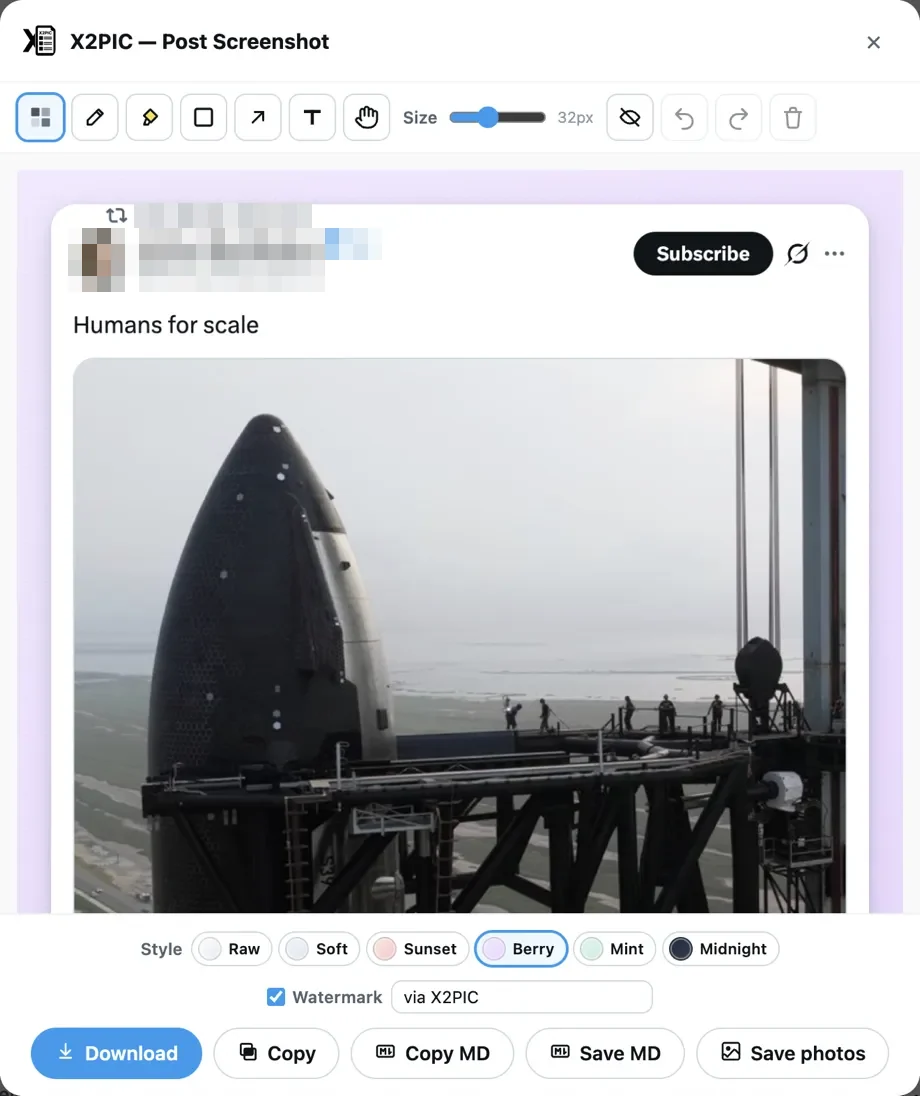
Download or copy
In the result dialog, save the PNG to disk or copy it to your clipboard.

Your captures never leave your device
The extension renders every screenshot on your own machine. There is no account to create, and nothing you capture is ever uploaded.
- No capture, URL or post content is ever sent to us or to any third party. The one exception is Save photos, which downloads a post's original photos directly from X's image server (pbs.twimg.com).
- No analytics, telemetry, advertising, tracking, or fingerprinting in the extension.
- Pro only: your license key and a device identifier are sent to our license service and Creem to activate and check your license — nothing else.
- Captured images live in memory only while the result dialog is open.
Minimal permissions, clearly explained
No <all_urls>. Runs only on x.com / twitter.com.
activeTabCapture the visible X tab — only after you click the icon.scriptingScroll the post into view while stitching long captures.downloadsSave the PNG via the standard save dialog.clipboardWriteCopy the PNG to your system clipboard.storageRemember your preferences and, if you have one, your Pro license.alarmsCheck a Pro license about once a day. No other use.Free to use. Optional Pro upgrade.
Capturing, stitching, frame styles, annotations and every export option are free. Pro adds the Aurora style and your own watermark text.
X2PIC
Free
Everything you need to capture, annotate and export X posts.
- Main post + selected replies in one image
- Auto-scroll stitching of long posts
- Six frame styles
- Annotation tools and one-click identity redact
- PNG, Markdown and original-photo export
- "via X2PIC.buzz" watermark — switch it off anytime
X2PIC Pro
Monthly
7-day free trial
Free for 7 days, then $2.99/month. Renews automatically; cancel anytime.
Everything in Free, plus:
- Aurora output style
- Custom watermark text
- One license key · up to 3 devices
X2PIC Pro
Yearly
7-day free trial
Free for 7 days, then $9.99/year. Renews automatically; cancel anytime.
Everything in Free, plus:
- Aurora output style
- Custom watermark text
- One license key · up to 3 devices
X2PIC Pro
Lifetime
Pay once, no renewals. Includes all future Pro features.
Everything in Free, plus:
- Aurora output style
- Custom watermark text
- All future Pro features
- One license key · up to 3 devices
Prices are in USD and include applicable taxes, such as VAT or sales tax. Monthly and Yearly start with a 7-day free trial: you are first charged when the trial ends, unless you cancel before then. The first payment of each purchase can be fully refunded within 14 days; automatic renewal charges are non-refundable. Payments are processed by Creem, our merchant of record. By buying Pro or starting a trial you agree to our Terms of Service and Privacy Policy.
Compare Free and Pro
| Feature | Free | Pro |
|---|---|---|
| Pick mode — click the posts you want to capture | Included | Included |
| Main post + selected replies in one image | Included | Included |
| Auto-scroll stitching of long posts | Included | Included |
| Six frame styles: Raw, Soft, Sunset, Berry, Mint, Midnight | Included | Included |
| Annotation tools: mosaic, pen, highlighter, frame, arrow, text | Included | Included |
| One-click identity redact | Included | Included |
| Download / Copy PNG, automatically size-optimized | Included | Included |
| Copy / Save Markdown, Save original photos | Included | Included |
| Default "via X2PIC.buzz" watermark (can be switched off) | Included | Included |
| Aurora output style | Not included | Included |
| Custom watermark text | Not included | Included |
How Pro works
7-day free trial
Monthly and Yearly start with a free trial. Nothing is charged at checkout; your first payment is taken when the trial ends. Cancel in the Creem Customer Portal before then and you pay nothing. Lifetime has no trial.
Instant activation
Right after checkout — also when you start a free trial — Creem emails you a license key. Open X2PIC Settings (right-click the toolbar icon → Options), paste the key and click Activate.
Up to 3 devices
One license key works on up to 3 devices. Deactivating a device in Settings frees a slot for another one.
14-day refund
Not happy? Email timojo.sun@gmail.com within 14 days of your first payment for a full refund, no questions asked. For Monthly and Yearly, that is the first charge when the free trial ends; for Lifetime, the one-time purchase. Renewal charges are non-refundable, so cancel before your renewal date if you do not want to renew. See the refund policy.
Cancel anytime
Subscriptions renew automatically until you cancel. Cancel yourself anytime — including during the free trial — in the Creem Customer Portal by signing in with your purchase email. Cancel before your renewal date to avoid the next charge. Manage or cancel your subscription →
Frequently asked questions
No. X2PIC is an independent, unofficial project. It is not affiliated with, endorsed by, or sponsored by X Corp. "X", "Twitter", the X logo and the Twitter bird are trademarks of X Corp.
Screenshot X posts the clean way
Free to use, local captures, privacy-first. Add X2PIC to Chrome and capture your first post in seconds.